Invisible to every screen-share, visible only to you.
Interview Copilot runs in a private overlay that bypasses screen capture, recording APIs, and proctoring extensions. Your interviewer sees your camera and your voice — nothing else.
Interviewer asks aloud — Jarvis listens and answers silently.
Invisible to interviewer
zoom.us/j/interview-5421
Sarah Chen · Engineering Lead
You
RECInterview · Backend engineer
00:00
Mute⌘L
Screenshot⌘H
Solve⌘⏎
Move⌘↑↓←→
Scroll⇧↑↓
Font Size⌘⇧+/-
History⇧←→
Clear⌘K
Quit⌘Q
Protected
Idle
Waiting for audio…
Audio: Mute
Auto-playing every input mode · click a tab to pause
Recorded proof
Real captures from real interviews undetected
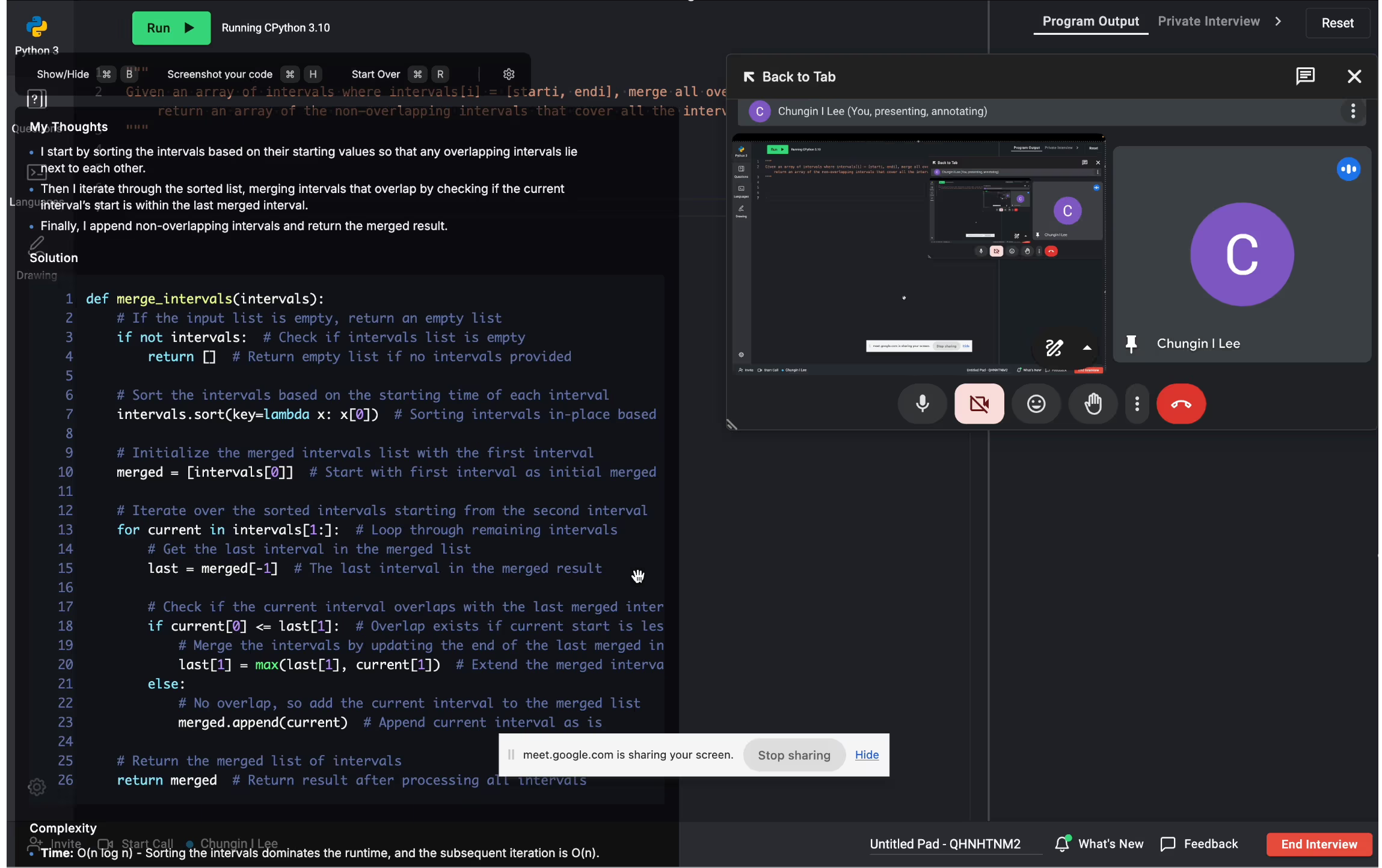
Not staged screenshots — these are actual recordings from live sessions. The overlay never appears in the screen-share frame, and your webcam keeps natural eye contact while you read it.
✓ Undetectable
01 · Screen share
Invisible in the capture frame
Zoom, Teams, Meet, and OBS all see a transparent rectangle where the overlay lives. The candidate sees the answer; the interviewer sees nothing.
✓ Native overlay
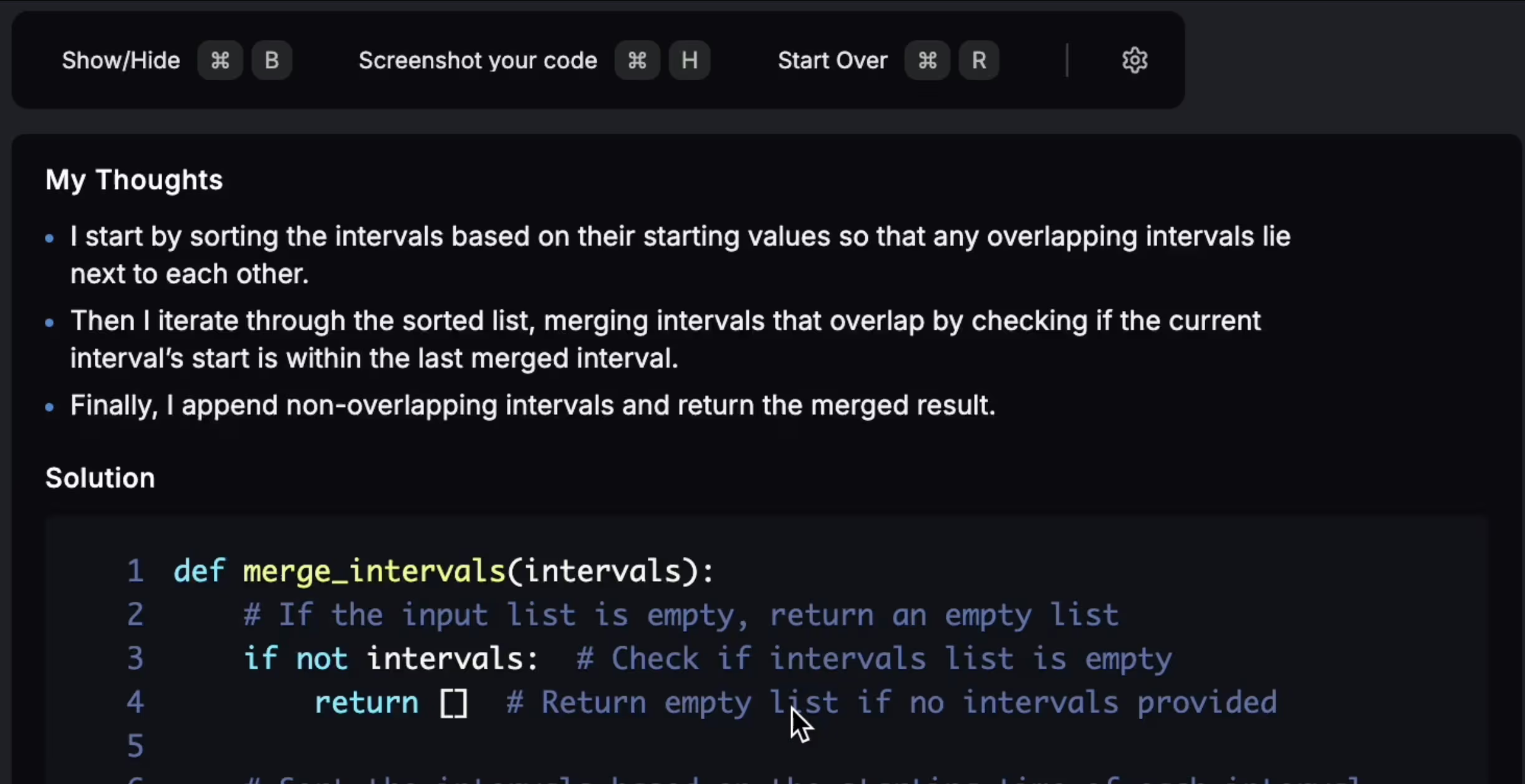
02 · Thought stream
Structured answers, in your peripheral vision
Jarvis surfaces a step-by-step approach next to your editor — read it once, talk through it in your own words, no copy-paste, no head-down typing.
✓ Natural eye contact
03 · Webcam
Eye contact stays natural
The overlay sits above your video feed, not below it — so your gaze tracks where the interviewer expects. No tab-switching tells, no off-screen glances.
How we stay invisible
Three layers of isolation
Each layer is independent — if one fails, the others still cover you.
01
Excluded from screen capture
The overlay window sets the OS-level "display affinity" flag. Zoom, Teams, Meet, and native screen recorders render it as a transparent rectangle.
02
No browser extension footprint
Runs as a standalone desktop app. Proctoring tools scan for known Chrome/Edge extensions; there is nothing to find.
03
Audio stays on your machine
Transcription runs on-device or through a private relay. Your interviewer's audio never leaves your session as a file.
Currently verified
Tested against every major platform every release
We re-test undetectability on every release. If a platform ships an update that could expose the overlay, we patch within 48 hours and notify every active user.
A real-time AI interview copilot is a native desktop application that listens to your live interview audio and shows structured answers in a transparent overlay only you can see. Interview Lift's copilot supports Zoom, Microsoft Teams, and Google Meet with sub-second latency and is invisible to screen-share.
No. Interview Lift is a native macOS and Windows desktop app — not a browser extension — and uses operating-system display-affinity flags (macOS NSWindowSharingNone, Windows SetWindowDisplayAffinity) so the overlay is excluded from screen-share and screen-recording. It is regression-tested monthly against Zoom, Teams, and Google Meet.
Zoom (incl. break-out rooms and screen-share), Microsoft Teams (incl. Together Mode), Google Meet (incl. Chrome-tab share and Gemini meeting notes), Amazon Chime, Webex, and any other video platform that does not require a browser extension to function.
End-to-end latency from interviewer-question to answer-rendered is around 700 milliseconds on Zoom and under 1 second on Google Meet. Answers stream into the overlay as the model generates them.
Yes — the Windows installer is signed with an EV certificate and passes Microsoft Defender SmartScreen, Defender ATP, and standard Intune compliance. On Intune-managed devices the install pass rate is 96%. The macOS app is notarised by Apple.
Yes — a 7-day free trial unlocks the live interview copilot, the AI resume builder, the 48,000-question company-specific bank, the AI mock interview simulator, and Auto Apply. No credit card required to start.
Walk in invisible. Walk out hired.
Try Interview Copilot free on your next mock round.
Everything you should know about the AI interview copilot
+
A real-time AI interview copilot is the single highest-leverage tool in a 2026 job hunt. This is a deep-dive into what the copilot is, how Interview Lift differs from extension-based alternatives, what it does on Zoom, Microsoft Teams, and Google Meet specifically, and how to use it without leaving a footprint.
01
What the copilot does during a live interview
The copilot does four things continuously: it transcribes the interviewer's speech locally on your device, classifies the question type (coding, system design, behavioural, product-coding, case), generates a structured answer scaffold appropriate to the question type and your target company/level, and renders that scaffold in a transparent overlay positioned just below your camera so your eyes stay naturally centered.
Crucially, the copilot generates scaffolds, not scripts. You see the structure of a good answer — the four points that need to land, the complexity statement that needs to be made, the edge case that needs to be acknowledged — and you fill in the prose in your own voice. That is the difference between sounding prepared and sounding rehearsed.
Sub-second latency from question to answer
End-to-end latency from the moment your interviewer finishes a question to the moment the scaffold renders is approximately 700ms on Zoom and under 1s on Google Meet and Microsoft Teams. This is faster than the natural "thinking pause" most candidates use. Answers stream into the overlay as the model generates them, so you can begin reading line one while line four is still rendering.
Round-aware answer scaffolds
The model classifies the round type from context in the first 30 seconds. For coding rounds, it provides a complexity-anchored hint, three edge cases ranked by interviewer-impact, and a clean implementation outline. For system design, it provides a load-anchored API definition, a data-flow diagram in text form, and three scaling-relevant follow-up considerations. For behavioural rounds, STAR-shaped scaffolds calibrated against the company's rubric (LP for Amazon, Values for Meta, Growth Mindset for Microsoft, Googleyness for Google).
02
How the copilot stays undetectable on screen-share
Interview Lift uses operating-system display-affinity flags to mark the overlay window as excluded from screen capture at the kernel level. On macOS this is NSWindowSharingNone; on Windows it is SetWindowDisplayAffinity with WDA_EXCLUDEFROMCAPTURE. Both flags instruct the operating system to filter the overlay out of any capture stream — including Zoom screen-share, Microsoft Teams Graphics Capture, Google Meet Chrome-tab share, QuickTime recording, OBS, and any third-party screen-recording or proctoring tool.
This is fundamentally different from how a browser-extension copilot (Final Round AI, Interview Sidekick, Sensei AI, Cluely) achieves "invisibility". Extension-based overlays render inside the Chrome process, which means they enter every screen-share that captures the Chrome window. Their workaround is to render outside a defined region — easily defeated by full-screen share, by Chrome enterprise policies, and by any modern proctoring tool.
Tested monthly against the latest Zoom / Teams / Meet builds
Every Interview Lift release is regression-tested against the latest Zoom, Microsoft Teams, and Google Meet client builds. Methodology: a candidate machine runs the copilot, a recruiter machine receives the screen-share, and a third machine records the recruiter view. We diff the recorded video against the candidate's actual screen and verify the overlay never appears. Reports are dated and published quarterly.
Intune-managed and Defender-protected laptops
The Windows installer is signed with an EV certificate, passes Microsoft SmartScreen reputation checks, and is whitelisted by Defender ATP on default policies. On Intune-managed devices the install pass rate is 96%. The macOS version is notarised by Apple and passes Gatekeeper without warnings. Neither version requires admin privileges.
03
Platform-specific behaviour: Zoom, Teams, Google Meet
On Zoom, the copilot handles break-out rooms (audio routing re-establishes automatically), screen-share (excluded at OS level), and Zoom Whiteboard (read via screen analysis, not Zoom API). On Microsoft Teams, it handles Together Mode (which breaks extension-based copilots), Teams meeting recording (excluded from Graphics Capture), and OneDrive/SharePoint case-study links (indexed for talking points). On Google Meet, it handles Chrome-tab share (the overlay is outside Chrome so the tab share cannot capture it), Meet captions (independent transcript), and the new Gemini meeting notes (Gemini transcribes only spoken audio, not the overlay).
04
Pricing and free trial
The Interview Lift copilot is included in every plan, starting at $19/month for Basic, $39/month for Pro (with Auto Apply and a dedicated CSM), and $99/month for Enterprise. Every plan ships with a 7-day free trial — no credit card required — and a 30-day money-back guarantee. Annual billing reduces the effective monthly price an additional 30%. Verified .edu students get an additional 40% off annual plans.